Search This Blog

&

Yahoo Site Explorer Alternatives or Replacement Tools to Research Competitive Link Data

Saturday, December 3, 2011

Yahoo Site Explorer has been ended on 21st November 2011. According to yahoo search blog this data has been merged to Bing Webmaster Tools. Webmasters can find their own website link details in Bing webmaster tools but what about competitor backlinks? Now SEOs are facing difficulty in checking competitor’s link data. No need to worry, there are still some good free link analysis tool available which you can use for analyzing competitor backlinks.

Using SEOMoz’s Open Site Explorer you can extract quite similar information about any website. You can compare up to 5 competitor domains with this tool. This SEO tool provides information about several other factors like Page Authority, Domain Authority, Linking Root Domains and Total Links for free. While to check social mentions like Facebook Shares, Tweets, Google +1s and Facebook Likes you have to go with its PRO membership (which starts from $99/month).

Open Site Explorer


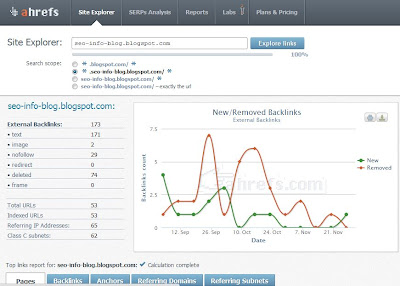
Using this tool you can know your competitor’s external backlinks, their numbers along with their types like text, image, nofollow, redirect, deleted, iframe etc. This tool also provides referring IP addresses and Class C subnets information. Tool’s free version will allow you to check index pages and backlinks, while to check anchor texts, referring domains and referring subnets you need to sign up for pro membership (which starts from $49/month)

Ahrefs Site Explorer


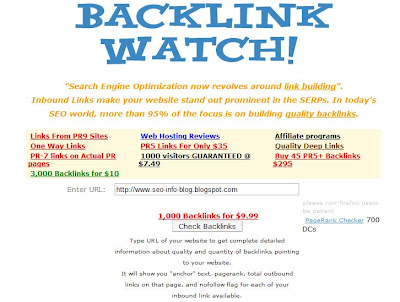
Using backlink watch you can easily find website’s backlinks along with anchor texts, page rank, total outbound links on page and nofollow tag for each inbound link. This tool is completely free.(As of now J)

Backlink Watch


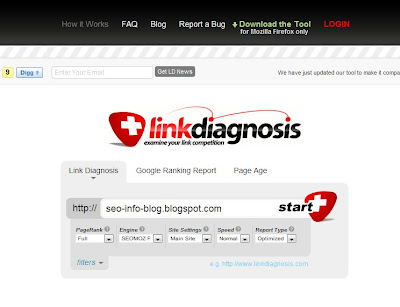
Using Link Diagnosis you can fetch all external links of any website along with Anchor Texts, Link Type, Page Rank, Outbound Links, MozRank, SEOMoz Page Authority and SEOMoz Domain Authority. You can also download its firefox extension for more detailed report.

Link Diagnosis
If you know about any other backlink analysis tool, please share in comments.

Now Manage Custom Search Engine within Google Webmaster Tools

Tuesday, October 18, 2011

Recently Google has announced that you can now create and manage a Google-powered customized search engine from your Webmaster Tools account only. To do so you just need to click on “Custom Search” Link in Labs Section.

Google will automatically create a default CSE (custom search engine) that searches only in your site. You can get the code to add your new custom search engine to your site. You can make some basic configuration to the CSE or continue to the full control panel for more advance settings.

Custom Search

You can always manage your CSEs from the “Custom Search” link in webmaster tools.

There are lots of advantages of CSEs like
  • CSEs can be customized like the look n feel of your site.
  • CSEs can improve the user experience with relevant results.
  • You can also make money with “AdSense for search” feature.
  • Helps in getting better conversions and retention etc.
Google is trying to make things easier and faster, so that you can easily manage your CSE; direct from the Webmaster Tools. If your website still don’t have a Custom Search Engine, try it…because it became more easy now :)

Google is planning to introduce +1 button for AdWords

Wednesday, June 29, 2011

Today I received an email from Google AdWords Team which was about +1 button integration to my AdWord ads. According to this email you can see a +1 button with your ads very soon. When someone searches on Google, (while signing in his Google Account) he will see a +1 button on your ad, user can click on +1 button to recommend your ad. Recommendations always play an important role in search results. Before AdWords, +1 button is already in use for organic search results & has impacted the search engine rankings as well. Now be ready to see the impact of +1 button on your ads, one possibility is that it may increase your Ad position.

What will be the exact impact of +1 button to ads? We will know once they will be in use.

You don’t need to do anything to use this +1 button for your ads, Google itself integrate +1 button for all AdWords Ads. On the other hand you can add this +1 button to your site, so that the visitors of your site have an opportunity to +1 your site.

You can check the below email which I got from Google AdWord Team.

“Hello,

This email is about your AdWords account XXXXXXXXXX

In the coming weeks, your search results and ads on Google will include a +1 button, which users can click to recommend your ads. You don’t need to make any changes to your account in order to take advantage of them. The final landing page URL of your ads can also appear on the Google profile of any user who +1’s your ad.

Here’s how the +1 button works:
Let’s say you own a hotel in Madrid. Brian had a lovely stay at your hotel last summer. When Brian starts researching accommodations for his next trip to Spain, he searches on Google while signed into his Google account, and sees your ad. He clicks the +1 button on the ad to recommend it to his contacts.


When Brian’s friend Ann plans her trip to Spain, she signs in to her Google account, searches, and also sees your ad – plus the personalized annotation that Brian +1’d it. Knowing that Brian recommends your hotel helps Ann decide where to stay during her travels.


Think of the +1 button as a way for fans of your business to recommend what you offer, for all their friends and contacts to see. By helping searchers see more personal, relevant ads, we believe you’ll see more qualified traffic. You can also add the +1 button to your site to give your customers the opportunity to +1 your site after visiting it.

To learn more about what’s changing and how +1 works, visit the AdWords Help Center.

To add the +1 button to your site, visit the +1 button tool on Google Webmaster Central.

Sincerely,
The Google AdWords Team”

Update: Google has started showing +1 button for Google Ads, see below screenshot.


Google Encourages Use of “Google Apps for Business”

Wednesday, June 22, 2011

If you are a Google Analytics user, hopefully you have received following mail from Google Analytics Team...

“As you track your marketing campaigns and improve your website's performance using Google Analytics, you'll find that this type of work can often involve a lot of data, cross-team communication, and collaboration. Try Google Apps for Business, a suite of online office tools to help coordinate and manage your web efforts while also improving your overall business productivity.

Create company email accounts for all your employees to manage access to Analytics and other Google tools.

Use Google Docs to track and share web changes, tracking tags, and performance metrics

Use Google Calendar to keep track of your web changes and important updates

Even more, as a Google Analytics user, setting up Google Apps is easy. Use your Analytics account to easily verify that you own your domain and activate Google Apps. Learn More

Sincerely,
The Google Analytics Team”

Introduction to Google Apps for Business

Google Apps for Business is a powerful suite of online tools which can help your business. You can access these web based tools from anywhere at anytime. These tools include Gmail, Google Calendar, Google Docs & Google Sites.

Through Business Email you can create a customized email id on your domain. You can access this email from anywhere at anytime using desktop, laptop, mobile phone & even in offline mood also. This business email provides you more space than any normal Gmail account.

Using Google Calendar, you can plan events, meetings and send invites to people. This calendar can easily manage RSVPs and is accessible from anywhere for company employees. You can also send text reminders by using this through mobile phone.

Through Google Docs all your company employees can access their updated files, presentations, data sheets, and spreadsheets from anywhere. Various file formats like doc, ppt, pdf and xls are supported by this application. You can easily access, upload and limit the access of files with this handy tool.

Google Sites will allow you to create internal sites to easily manage projects and other information. You can centralize all your company information with this secure application. Various free templates are there to make the website building process faster.

If you own a business, try these tools to better organize your business with a free 30 days trial.