Search This Blog

&
Showing posts with label Google Webmaster Tools. Show all posts

Now Manage Custom Search Engine within Google Webmaster Tools

Tuesday, October 18, 2011

Recently Google has announced that you can now create and manage a Google-powered customized search engine from your Webmaster Tools account only. To do so you just need to click on “Custom Search” Link in Labs Section.

Google will automatically create a default CSE (custom search engine) that searches only in your site. You can get the code to add your new custom search engine to your site. You can make some basic configuration to the CSE or continue to the full control panel for more advance settings.
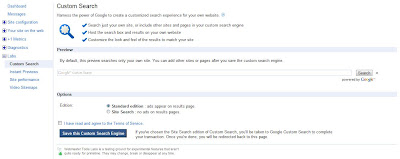
Custom Search

You can always manage your CSEs from the “Custom Search” link in webmaster tools.

There are lots of advantages of CSEs like
  • CSEs can be customized like the look n feel of your site.
  • CSEs can improve the user experience with relevant results.
  • You can also make money with “AdSense for search” feature.
  • Helps in getting better conversions and retention etc.
Google is trying to make things easier and faster, so that you can easily manage your CSE; direct from the Webmaster Tools. If your website still don’t have a Custom Search Engine, try it…because it became more easy now :)

Instant Previews in Google Webmaster Tools

Thursday, May 19, 2011

Google has launched instant previews in November, 2010 which shows a quick preview of the search results to user.

Sometimes instant previews look different from what users see on your websites. In this case Google is having some problem in crawling your site. These problems may contain:

  • Resources blocked using robots.txt file
  • Flawed content served to Googlebot
  • Bad alternate content for flash (if flash is not available)

Now Google has introduced a new Instant Previews Tool, using that all webmasters can diagnose their website problems and rectify them.

In Instant Preview Tool at Google Webmaster, webmasters can compare their site as they open in browser (like chrome) and its instant preview. Google recommends using alternative content for flash and silverlight because the webkit that generates both renders does not include plugins.

Instant Previews


You can also see a list of problems which Google is facing while crawling your site.

Now Link Your Google Analytics Account to Webmaster Tools

Friday, February 18, 2011

According to Webmaster Tools Central Blog, If you are a site owner and using same Google account for both Google Analytics & Google Webmaster Tools, then you can link your webmaster tool verified website to analytics profile for that website.

Now it is possible to access your analytics data through webmaster tools. You can directly access the referring sites report of your analytics profile through “Links to your site” page in webmaster tool.

Also you can easily access your analytics data without login to Google analytics account. You can simply access the analytics account from the navigation link on the top left of webmaster tools. In case of multiple website owners, each owner has to link its own webmaster profile to analytics account.

If you have a webmaster tools verified site and want to link it with Google analytics account. Just follow below 2 steps.

Go to the home page of webmaster tools, click on manage next to the site you want to connect with analytics account. Then click on Google analytics profile


Then select the website profile and save it.

Associate Google analytics profile

Holiday Update for Google Webmaster Tools

Thursday, December 23, 2010

Google has announced new updates for Google Webmaster Tool. It was declared at Google Webmaster Central Blog on Dec 10. This update includes new modifications in “Links to your site” and “Search queries” features.

“Search Queries” Feature Update
Based on user feedback, Google has made some changes to its “Search Queries” section. User can now see the “Search Queries” data for individual pages of site. Now, when user visit “Top Queries” tab, he will find a new Tab named “Top Pages”. This “Top Pages” tab will provide impressions, clicks, CTR and position data for all the top pages of user’s website who are performing good on Google search results.


To see the queries along with their impressions and clicks, user can simply click on the individual page.


 User can also click on the specific query to see the detailed data.

A pie chart is also added for visual representation of the proportions of search type, traffic and its location.


“Links to your site” Feature Update
Google has introduced an “Intermediate Link” concept in which, if there is a link to user’s site that links to URL1 which further redirects to URL2. Then the link from URL1 to URL2 will be shown as an intermediate link. User can also see new “Download all links” option for all tables of “links to your site” feature.


Google is continuously upgrading its tools for providing better data to us. Hope you are pleased with that. Happy Holidays :)