
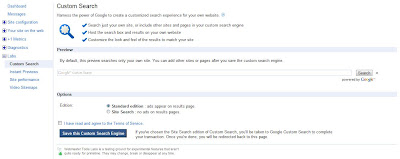
Recently Google has announced that you can now create and manage a Google-powered customized search engine from your Webmaster Tools account only. To do so you just need to click on “Custom Search” Link in Labs Section.
Google will automatically create a default CSE (custom search engine) that searches only in your site. You can get the code to add your new custom search engine to your site. You can make some basic configuration to the CSE or continue to the full control panel for more advance settings.
There are lots of advantages of CSEs like
Google will automatically create a default CSE (custom search engine) that searches only in your site. You can get the code to add your new custom search engine to your site. You can make some basic configuration to the CSE or continue to the full control panel for more advance settings.

You can always manage your CSEs from the “Custom Search” link in webmaster tools.
There are lots of advantages of CSEs like
- CSEs can be customized like the look n feel of your site.
- CSEs can improve the user experience with relevant results.
- You can also make money with “AdSense for search” feature.
- Helps in getting better conversions and retention etc.